Tuesday, October 27, 2009

Counting on SPARQL Aggregates

This is largely a note to myself so I can remember the syntax for a DISTINCT count which is somewhat unintuitive. The regular syntax to get a count:
  SELECT (count(?foo) AS ?count)
WHERE { ... }
However, this will not be a unique count of the ?foo items. To make the count DISTINCT the syntax is:
  SELECT (count(DISTINCT ?foo) AS ?count)
WHERE { ... }
Not:
  SELECT DISTINCT (count(?foo) AS ?count)
WHERE { ... }
where the DISTINCT in this case has no impact whatsoever.

The use of the "AS" keyboard is itself unintuitive as it breaks the norm for how variable assignment is expressed in the WHERE clause. In fact I think it would be good to drop it and keep the SPARQL vocabulary minimal. The only use of "AS" that I've encountered is to assign a variable in a SELECT statement in the form:
  SELECT (count(?foo) AS ?count) ...
The oddity here is that the variable ?count is assigned on the right hand side of the operator, "AS", instead of the left hand side as we've gotten used to with LET functions. Why not use LET here as well? For example:
  SELECT LET(?count := count(?foo)) ...


Wednesday, September 30, 2009

A New SPIN Cycle

My first SPIN cycle was about 10 months ago in the first part of December. It was short lived as I had to dive deep into other things quickly and the new concepts that I was struggling with then didn't get the chance to sink in before their memory would begin to fade.

At that time I was struck by SPIN's potential and the promise of having a semantic rule language that applied a language that I already knew and evoked daily -SPARQL. Working previously with SWRL had left a bad taste in my mouth for rule languages. Nothing against SWRL itself, it was the engines that processed it that seemed to be the problem. They were disappointingly slow to say the least. Just to detect simple "uncle" relationships in a small family tree the engines would take tens of minutes if they didn't crash altogether. The logician in me was drawn toward rule based specifications, but the pragmatist in me was left wondering why use rules when you could get the same information a thousand times faster with a SPARQL query?

It didn't occur to me to put the two together (not that I could have), fortunately it did occur to the very capable Holger Knublauch.


While I did not use SPIN during the intervening months, I did use it indirectly in setting up SPARQLMotion web services. To make a SPARQLMotion script accessible as a web service you first define a SPIN function, incoming arguments, then point the function at a SPARQLMotion return module. Reapproaching SPIN at the end of September I found that the function side of it was already familiar, and TopBraid Composer has evolved nicely to make working with SPIN a more natural experience.

SPIN now comes with a small library of useful functions in addition to the XPath (fn:) and ARQ (afn:) SPARQL functions that Jena supports as well as the SPARQLMotion functions (smf:). These functions serve the most common types of operations that you would encounter and provide the basic building blocks that you would need to build new functions in SPIN.

Consider the scenario that I found myself in recently where I wanted to convert only the first character of a string to uppercase. fn:upper-case was the closest thing available but it operates on the entire string. Not to worry, a few lines of SPARQL can handle it:

?resource rdfs:label ?label .
LET (?lcFirstChar := smf:regex(?label, "^(.).*$", "$1")) .
LET (?ucFirstChar := fn:upper-case(?lcFirstChar)) .
LET (?newLabel := smf:regex(?label, "^(.)", ?ucFirstChar)) .

This gets the job done but I didn't fancy copying and pasting the lines over and over again each time I need them in some new query. Here's where SPIN functions come in. With SPIN functions you can take useful fragments of SPARQL expressions from a WHERE clause and turn them into parameterized functions that you can simply use anywhere. The above can be defined in a new SPIN function as seen in this TopBraid screenshot:


Note that in the spin:body the ?arg1 is a special variable in spin that corresponds to the first function argument. We may now apply the function in a LET statement in any SPARQL block as per:

LET ( ?newLabel := myFunc:ucFirst( ?label ) )

It gets even better. The family of available SPARQL functions are useful up to a point, but shortly you may find that you need a little more horsepower. Enter JavaScript and SPINX for extension languages. JavaScript can be applied to write function bodies that operate on variables passed in from a SPARQL WHERE clause. Lets try the ucFirst again, but this time to write the complement for lowercasing lcFirst:


On the SPARQL side the syntax is unchanged:

LET ( ?newLabel := myFunc:lcFirst( ?label ) )

In principle any scripting language may be applied in SPIN functions for which there is a JSR-223 scripting engine available. Note that I've been using the namespace "myFunc:" in these examples. It is the intention that developers would maintain the spin functions that they develop in an ontology just for functions. In this way creating a reusable library of functions that can be imported into new ontologies as needed.

Sunday, August 12, 2007

When not to use XML

Discovered the hard way that "xml" as the start of a namespace prefix (e.g. xmlfoo:) is a no-no. Apparently "xml" as a prefix within a namespace prefix is off limits -causes Jena errors.

Sunday, August 05, 2007

Always run consistency checks...

Always.

Jena No Likey XML 1.1??

Having some headaches with Jena loading XML 1.1 based ontologies this evening. The underlying SAX parser is XML 1.1 capable but it seems that the parser is not instantiated with XML 1.1 options turned on.

Searching the net I'm not finding much discussion on the topic which leaves me wondering if I'm the first to arrive at this point. Does anyone know if there is a way, short of rebuilding Jena itself, to get Jena to load XML 1.1 based models?

Thursday, June 28, 2007

Ontologies do NOT import namespace prefix mappings

For quite a while I was lead to believe that namespace prefix mappings were imported into an ontology and were "known" and reusable by the importing ontology. While this is true for seemingly everything else: classes, properties, individuals, statements, it is not so for namespace prefix mappings.

Why? Well, namespace prefixes are an XML concept while the rest are ontology (RDF/OWL) concepts. TopBraid Composer also misdirected me a bit by reusing the same "shading means imported" paradigm used for classes and the like as it did for namespaces. For namespaces, shading does mean that they have come from an imported source, you just can't make use of them -they are presented for informative purposes only. If you do want to use a namespace from the import list, "Clone" it with the "Clone" button, this makes a local copy.

If you don't, TBC is smart enough to make some guesses to resolve unknown prefixes, but when it can't it uses a "j.#" (i.e. j.0, j.1, j.2 ...) as a place holder (really its Jena doing this).

Live and learn...

Tuesday, April 24, 2007

TBC: Indirect Instances

Finally!

For months my coworker has had a neat feature enabled in his TopBraid Composer where from a parent class the instance count of child, subchild, etc are indicated at the parent level in parenthesis. This is a nice feature because it saves you from drilling down class trees to find where your instances are.

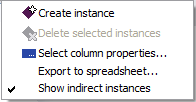
Only problem was he couldn't recall how he enabled the feature and it wasn't an option in the Window > Preferences > TopBraid Composer list. I stumbled into it under the "Instances" window options. Its the last option with the label "Show indirect instances":

This feature definitely reduces my instance hunting time, modeling life just got easier.

Wednesday, April 11, 2007

SeRQL Query for all Resources w/o Some Relationship

After a few tries I managed to form a SeRQL query that would give me resources of a given type that did not have a given relationship:

select distinct
localName(A)
from
{A} rdf:type {foo:AClass}
where not exists (
select A
from
{A} foo:hasBar {B}
)
using namespace ...

Still, it seems this could be more simply expressed, what I was initially expecting was something more concise such as:


select distinct
localName(A)
from
{A} rdf:type {foo:AClass},
![{A} foo:hasBar {B}]
using namespace ...

Tuesday, April 03, 2007

The Case for Anti-Triples

A super convenient feature of TopBraid Composer is the capability to manage and manipulate triples. You can drag a statement from one resource and copy onto another, or a selected group. This saves lots of repetitive work. Yet another reason TBC is my favorite ontology editor.

It is so convenient and you quickly become so dependent on the feature that you start wishing that you could remove triples from a group of resources in the same way. Triples are always additive in these scenarios, they can only add information and not remove it. Thus the need for an anti-triple, a triple that represents anti-information.

This could simply be a triple that is flagged to have a negative sign, so when dropped onto a resource it remove an occurrence of itself -or the pattern it represents. Thought of another way, when a triple meets an anti-triple in an ontological space, they annihilate each other.

I'm thinking of anti-triples as an editing paradigm of convenience of course. For instance a triple could be dropped onto a resource with the "-" key held down to take the deletion action.

Of course Anti-Triples recognized in a future OWL revisions could lead to anti-ontologies of a anti-knowledge, which would no doubt be abused by black-hats for information espionage and evil doing. Eventually getting fully out of hand by a mad scientist bent on the uncreation of the Semantic Web lest our hero reaches the glowing red off button in the control room in the base of the hollowed out volcano which has just decided to conveniently erupt.

Time to write a screen play... maybe the Semantic Web will lead to a revival of all the cheezey "net" movies and television shows of the late 90s. Will semantics make the net-cheeze-flicks any more intelligent this time around?

TBC Tip: Form Clicks for Productivity

I've learned quite a lot about TBC since my last post in January and have a backlog of tips and techniques to record here, no doubt I've already forgotten a few, but they should come back to mind eventually.

A trick I've learned only this week helps when working with Class and Resource Forms. When in a Form view, an alternative to pulling down and selecting the "Add empty row" menu item one can simply double click on the property label. For example when adding subclass constraints you may double click the "rdfs:subClassOf" label and an empty row appears. This saves some mouse work, still I'd like to see the "Insert" key do the same.

Another trick can simplify adding new properties to a form. In addition to dragging and dropping a property onto a form, you can right-click the form background and receive a list of applicable properties. Depending where you click on the form (Annotation, Axiom, or Other Properties sections) you get a context sensitive list of properties.

Less mousing around, more modeling, good stuff!

SPARQLets!

A neat feature of TopBraid Composer is the ability to save SPARQL queries in your ontology, as a "sparql:query" string type. These queries will then appear in "Query Library" tab where they can be invoked by simple mouse clicks. The inferred results can also be asserted and saved back into the model.

The stored queries are bound to a particular ontology though. I'd like to have a capability to store general queries in a "bookmark" like form that could be invoked against any ontology. This would be analogous to Bookmarklets (Bookmarks of Javascript Applets), thus SPARQlets!

For next week - SPARQLets that say "ni!"

Friday, January 05, 2007

Dropping Triples

Discovered another neat labor saving TopBraid Composer feature. Lets say you create a new property, apply it to an instance with some value, then need to repeat for oodles more instances of the same class, or may apply over various classes. Select the instances that you want to update and drag them in the Basket.

Now go to Window > Show View > Triples. The Triples window will appear, then check the ontology you want to work with, click the first "triple" icon, and navigate to and select the instance where you have already applied the property that you want to copy. Once you have a list of all triples where that instance is the subject shall appear.

Now the neat part. Select the triple(s) that you want to apply to instances in your basket, and simply drag and drop them on. A prompt will appear to ask if you want to apply the triple to the all individuals in the basket, making them the subject, click "Yes" and voila! You've just saved yourself a lot of repetition.

Neat feature #2:

I've been seeing the not-so-intuitive icon around, wondering what it was and never using it. Now its my favorite feature. Visually I thought it looked like something was being downloaded or saved. Its a reference finder, maybe binoculars would be a better mnemonic, I can't suggest anything sensible that makes for a better "reference" image. Select a property, class or instance, double click it to load it into a form. Then hit the "Find references" button, a tab will open in the lower pane with the label "Reference" and shows you call cases where that entity shows up in a triple.

Very handy if you're considering deleting an item, check first if it is referenced anywhere.

Wednesday, December 20, 2006

TBC: Name Completion with Ctrl+Space

Learned another TopBraid Composer trick: when filling out form fields, you can type Ctrl+Space bar to do name completion, very handy. Of course dragging and dropping classes into the slot areas works as well.

Probably lots more tips waiting for me if I read the manual one day...

Friday, December 15, 2006

HowTo: Remember Your Power Chord

Not a semantic tech topic, but a note to self on how to be a better computer user and save much pain and anguish. A coworker rescued me last night when I had left my laptop's power chord in the office when returning to my hotel. I've done this a number of times, the worst case undoubtedly in 2003 when I discovered at the airport that I had left my power cable behind and had no time to retrieve it before making a 3+ week international journey. A great friend who had a key to my house dashed off, found the chord (amongst many similar chords), sped off to the airport and saved the day. I thought that would be enough to teach me never to forget my chord again... it wasn't.

But now, I think I've hit upon a nearly fool proof way to always remember it:
Pack the chord first.
Pack the chord before you pack up the laptop.
The risk is then that you might get distracted before packing the laptop itself. The obviously too lite computer bag is sure to remind you, so risk mitigated.

Wednesday, December 13, 2006

Class Labels & Window Wrangling

Learned some new tricks with TopBraid Composer and Eclipse.

When you create a new class or subclass in TBC, at the bottom of the wizard window there will be rdfs:label under the "Property" column and an empty cell in the "Initial Value" column. Check the rdfs:label checkbox and in the "Initial Value" column put {name}. This sets the default value for future class creations as well. {name} will automagically copy the class name into the rdfs:label field after you click "Ok".

Somehow I managed to make my "Classes" window a tab of my "Navigator" window, and also managed to make my "Basket" window pane a tab within the pane to its left. Restoring the tab into a separate window pane is not intuitive. The way to do it is to hold down your left mouse button and drag the window to the edge of eclipse (left-right, or top-bottom) until a black arrow head appears. When this arrow head appears, you can release the mouse button and the window is returned as either a vertical split or horizontal split depending on where you dragged the window to. This also works in other places where you see tabs, such as for source files. Move a source tab in the same way and vertically split the pane, then seeing both windows side by side.

Friday, December 08, 2006

A Trisket, A Trasket, A Little Semantic Basket

Spent some time writing my first eclipse plug-in following the steps on the TopBraid Composer (TBC) Plug-in Development Guide, fun stuff! Plus I learned my new favorite eclipse command Ctrl+Shift+M which will automatically add the import for an unresolved class (keep your mouse over the class when hitting the sequence).

So I used the CreateInstanceAction skeleton and added my own JenaFu to find the resources I wanted from the loaded model, then printed the resources to System.out. It soon dawned on my that the snazier thing to do would be to send the resources to the "Basket" instead. Some inquiries to the TBC folks uncovered that the needed BasketView class was not exported from the jar in TBC 1.3, but they did export it in the 1.4 release that came out today. Thanks guys!

The tweaks needed:

import org.topbraidcomposer.ui.views.basket.BasketView;
:
IWorkbench wb = org.eclipse.ui.PlatformUI.getWorkbench();
IWorkbenchWindow wbw = wb.getActiveWorkbenchWindow();
IWorkbenchPage wbp = wbw.getActivePage();
:
try {
BasketView basket = (BasketView)wbp.showView("org.topbraidcomposer.ui.views.basket");
:
while (iter.hasNext) {
basket.add( (Resource)iter.next() );
}
:
}
catch(PartInitException ex) {
:
}

Some gotchas:

1) wb.getActiveWorkbenchWindow(); will return null if it is not invoked within a "UI Thread". So if these basket sending lines are in the "AbstractChange" class, or in another class that's called by the AbstractChange class, then you're in a UI Thread and it bombs.

2) code put after the TB.getSession().getChangeEngine().execute(change); will be executed before the line. Really.

3) you don't actually need the AbstractChange class and the corresponding TB...execute(change); line unless you've modified the loaded model.

4) if you do modify the model and want to send items to the basket, then invoke the TB...execute(change); line with an extra argument as per:

Runnable andThen = new Runnable() {
public void run() {
sendFoundStatementsToBasket();
}
};
TB.getSession().getChangeEngine().execute(change, andThen);

or with an anonymous runnable as the 2nd arg.

Sunday, November 26, 2006

del.icio.us dreams

It struck me today that I could use the "notes" field for annotation. For example, if I tag restaurants or parks that I want to visit, I can write my reviews of them later. A reminder to myself for whether or not I would want to return. Or I could also tag such sites with "good", "bad", but this is not expressive enough.

The notes field likely has some length limitation that wouldn't allow for much annotation, perhaps it can store a URL back to blog page that would have a more in-depth annotation.

What I'd really like from del.icio.us would be a way to relate tags with my own properties. While dreaming, why not go all the way and extend the tag editor to a full OWL class editor?

If you're going to dream, dream big. Time to look for the del.icio.us feedback form...

Monday, November 13, 2006

Early SPARQL Impressions

I postponed blogging this, then had to relearn this morning how I did it -shame!

Spent my first significant amount of time with SPARQL in the middle of last week and had to struggle with it a bit before getting the hang of it. I seem to get more (initially) out of struggling than reading through documentation -but will do that later for the advanced syntax.

TopBraid Composer has a decent SPARQL interface, very handy and has enough smarts that it is aware of local prefixes, they need not be specified via PREFIX. I wish it had a little more sanity checking though, it doesn't complain if you SELECT a variable that is never defined in the WHERE, it silently returns an empty list of results. Some of my typos got through in that way leading me to think I had malformed WHERE syntax.

I've got to find out what "." really means, right now I view it as a pipe where the result set from the first part of a condition are fed into the next. That is each successive predicate operates only on the set found by the preceding predicate. No space is needed after the "." and the end of the predicate string, and the dot after the final predicate is optional.

This took me a number of tries, How to find the rdfs:labels of instances of some subclass:

SELECT ?label
WHERE {
?sub rdfs:subClassOf foo:Bar .
?inst rdf:type ?sub .
?inst rdfs:label ?label
}

Which I read as bottom-to-top as "find all labels, of all instances, of all subclasses of foo:Bar". Or top-to-bottom as "find all subclasses of foo:Bar, then find all instances of the subclasses, then all the labels of the instances". Maybe there is a cdecl for SPARLQ.

The Jena SPARQL page has a tutorial along with a list to other tutorials.

Monday, November 06, 2006

First Post

The birth of the semantic web had Tim Burners Lee been a less than benevolent overlord and had an Emporer Palpatine / Darth Sidious split persona:


TBL: Syntactic Web.

Syntactic Web: Yes Master?

TBL: rrrrRRRiiiiIIIIIIiiiiissse.....